Warning 113 | [PSCAD™] | Cannot find output TITLE=
Relevant software:
Emitted message:
Could not find the specified channel in any loaded PSCAD case file or libary file - check for potential typos
Prior to gridmo Engine v1.4.23, the gridmo Engine would automatically enable any channel recording blocks which matched the specified TITLE= argument.
However, from gridmo Engine v1.4.23 onwards, the gridmo Engine does not enable any disabled PSCAD™ channels. This is to avoid raising output is ambiguous warnings.
Description:
This warning indicates that the gridmo Engine could not find the specified output channel in the loaded PSCAD™ workspace.
Click here for details on the OUTPUT command.
Possible impact:
- Missing data in simulation results - attached Plot Node(s) may appear empty
When an output channel cannot be found, no data will be captured for that channel in your simulation results.
Potential fixes:
gridmo Template changes not yet made
The majority of OUTPUT commands in gridmo's standard power system templates use built-in channels within the smiby block.
However, some channel data, such as P, Q and V at inverter terminals or status signals, need to come from elsewhere in your PSCAD™ model.
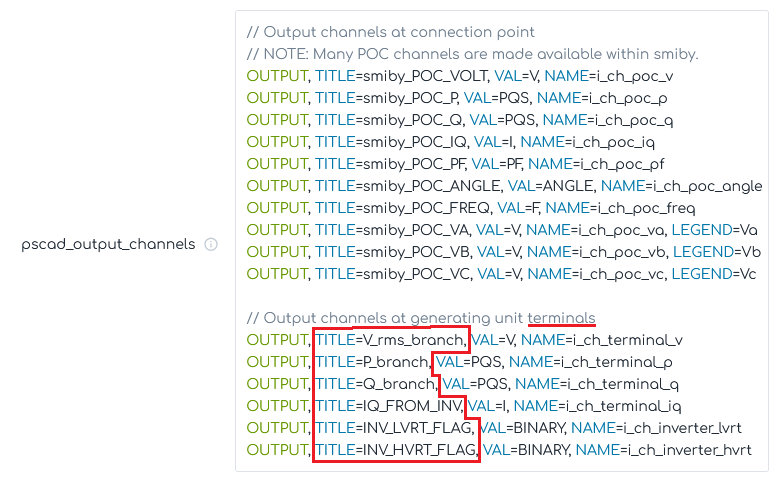
Review the OUTPUT commands in your gridmo web-app's $pscad_outputs Global Variable and check all TITLE= arguments that do not start with smiby have been renamed for your project (those highlighted above in red).
Check for typos in the channel name
Verify that the TITLE= parameter in your OUTPUT command exactly matches the channel name in your PSCAD™ model. TITLE= is case-sensitive.
Verify the channel exists in your model and is enabled
Confirm that the channel you're trying to record actually exists in your PSCAD™ model. You can do this by:
- Opening your PSCAD™ case file
- Searching for the
TITLE=argument in the project - Checking that the output recording block is enabled
Add the missing channel
If the channel doesn't exist in your model, you may need to add an output recording block to capture the signal you're interested in.