Warning 169 | [PSCAD™] | Multirate ENI or Data Transfer component detected
Relevant software:
PSCAD™
Emitted message:
Multirate ENI or Data Transfer component detected. PSCAD™ does not currently support running projects in parallel with these components.
Description:
This warning indicates that we have detected one or more Multirate ENI or Data Transfer components in your project. These components provide advanced functionality such as running different parts of your project on different CPU cores and with different solution time steps. These components are currently found inside the Intermediate Library for PSCAD™ V5.
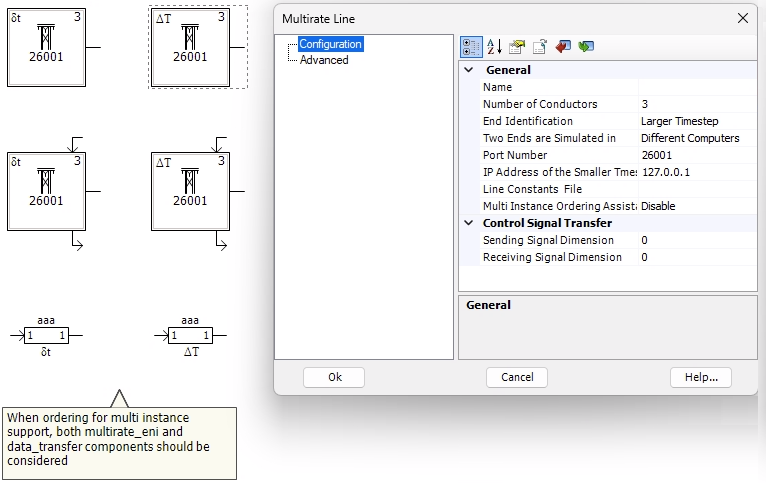
Depending on which version of the intermediate library you are using, there are two methodologies for passing data between the case files with different time steps:
- "Two Ends are Simulated in" = "Same Computer": PSCAD™ manages the transfer of data between the case files but doesn't currently supporting multiple projects running in parallel. If you try to run these in parallel, PSCAD™ will return an error, "ERROR: Abnormal termination of EMTDC by REMOTE_TLINE".
- "Two Ends are Simulated in" = "Different Computers": You can configure the transfer of simulation data using hardcoded IP addresses and port numbers. Therefore, it is possible to run two PSCAD™ simulations in two different windows which share the same IP address and port number. Through testing, we have observed that PSCAD™ does not detect any such conflicts and rotate ports. Therefore, there is a chance that two separate simulations may interfere with each other and cause unexpected results.
Possible impact:
If "Two Ends are Simulated in" = "Same Computer":
- PSCAD™ will return an error, "ERROR: Abnormal termination of EMTDC by REMOTE_TLINE" if you attempt to run more than one project in parallel.
If "Two Ends are Simulated in" = "Different Computers":
- Building such simulations in parallel may stall or happen very slowly.
- Simulation speed may decrease dramatically (e.g. 10x slower).
- Simulation outputs may have very strange results.
Potential fixes:
- Set the number of PSCAD™ workers in your Engine configuration to 1 to prevent parallel execution of the particular project. Remove this limit once simulations are completed.