Warning 101 | [Various software] | Thévenin source impedance abnormally high
Relevant software:
PSS®E
PowerFactory
Emitted message:
Detected abnormally large infinite generator source impedance.
Description:
This warning indicates that the Thévenin equivalent source impedance in your PSS®E or PowerFactory model is larger than recommended for SMIB studies.
danger
This warning indicates there may be an issue in your PSS®E or PowerFactory model which may impact generator performance and/or benchmarking with other software packages.
Possible impact:
- If you are using a
SET, LINE=, SCR=, XR=command, the fault level at the specified bus may be lower than specified by the command.- This can cause poor benchmarking with other software packages.
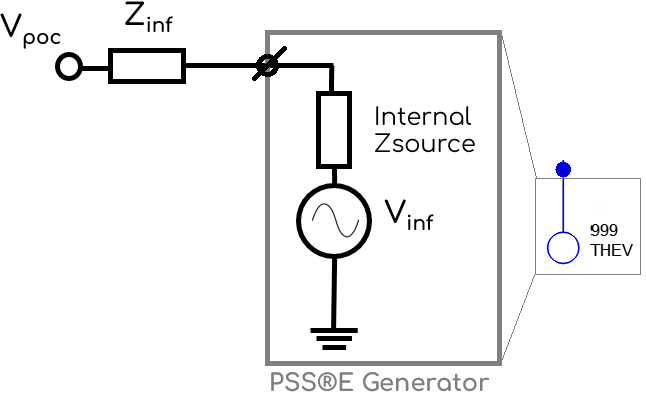
- This occurs because the source impedance of the generator model (which represents the Thévenin equivalent source) is added in series with the specified impedance.
- Voltage playback may produce voltages which differ from those specified.
- The voltage playback location in both PSS®E and PowerFactory is behind the generator's internal impedance - such as the below.
Potential fixes:
To resolve this warning and fix the associated issues, change the Thévenin source impedance to be as small as possible - effectively negligible compared to the rest of the system impedance. The effect of this impedance on the fault level is minimal and voltage playback will now work as expected.
PSS®E
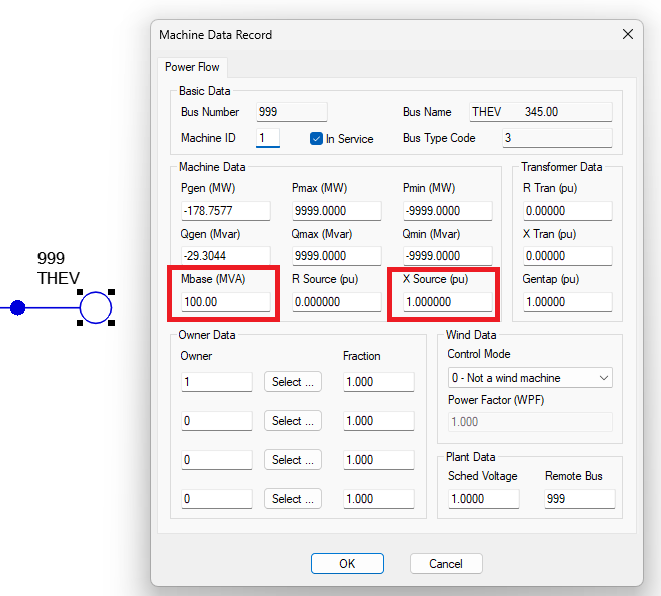
- Make the Internal Zsource of the Thévenin equivalent source as large as possible. Open your PSS®E model, double click on the generator representing your Thévenin equivalent source and complete the following (see image below).
- Change the
R source (pu)parameter from its current value to the minimum recommended resistance of0(note - this field defaults to0in PSS®E so it rarely needs to be changed). - Change the
X Source (pu)parameter from its current value (likely the PSS®E default of1.000) to the minimum recommended reactance of0.0001p.u. - Change the
Mbase (MVA)value from100to a higher value such as10000.
- Change the
PowerFactory
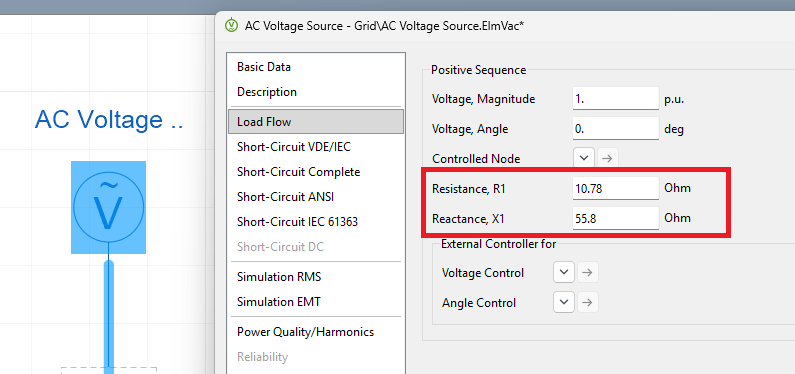
- Make the Internal impedance of the AC Source block equal to
0ohms. Open your PowerFactory model, double click on the AC Source block representing your Thévenin equivalent source and complete the following (see image below).- On the
Load Flowtab, changeResistance, R1to0ohms. - On the
Load Flowtab, changeReactance, X1to0ohms.
- On the